
Active Directory
Create and keep profiles up to date from the company's Active Directory or OpenLDAP directory, and disable those of people who have left.
The Active Directory module reads the company's internal directory (Active Directory or OpenLDAP) and keeps its profiles up to date: it creates those of newcomers, updates information and disables those of people who have left. This page can be passed on as is to the directory administrator.
Who does what
| Step | Who |
|---|---|
| Enable and configure the module in Profiles Flow | A Profiles Flow Administrator, with the information provided by the directory administrator |
| Create a read-only service account | The directory administrator |
| Open network access to the directory from the Profiles Flow server | The network administrator |
Prerequisites
- An Active Directory or OpenLDAP directory.
- The directory is reachable from the Profiles Flow server: port 389 (LDAP, or StartTLS) or 636 (LDAPS), open to this server's address. Ask Profiles Flow support for this address if you filter by address.
- A read-only service account: the module changes nothing in the directory.
- The establishments exist in Profiles Flow, under the name used in the directory (see below). See Establishments.
1. Set up the connection
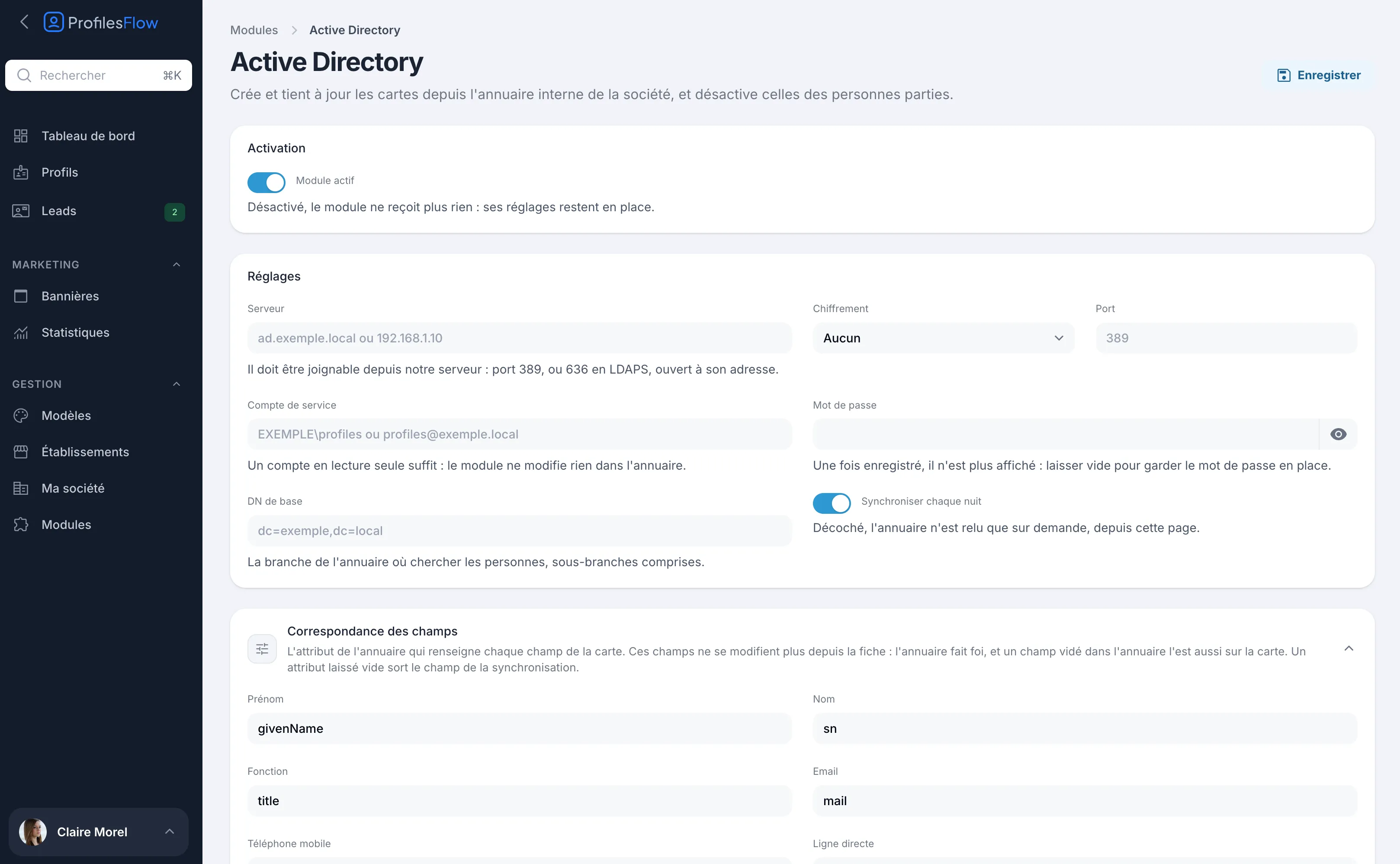
- Open Management › Modules › Active Directory, then turn on Module enabled.
- Fill in the Settings:
- Server: name or address of the directory, for example
ad.example.localor192.168.1.10. - Encryption: None, StartTLS or LDAPS, and the matching Port.
- Verify the server's certificate (encrypted connection): uncheck it if the directory presents a certificate from its own authority; the connection stays encrypted.
- Service account: for example
EXAMPLE\profilesorprofiles@example.local. - Password: once saved, it is no longer displayed. Leave the field empty to keep the current one.
- Base DN: the branch in which to look for people, sub-branches included, for example
dc=example,dc=localor a specific organizational unit. - Synchronise every night: when unchecked, the directory is only read on demand, from this page.
- Server: name or address of the directory, for example
- Click Save.
2. Check the field mapping
The Field mapping section shows the directory attribute that fills each profile field. The default values suit a standard Active Directory:
| Profile field | Default attribute |
|---|---|
| First name | givenName |
| Last name | sn |
| Job title | title |
mail |
|
| Mobile phone | mobile |
| Direct line | telephoneNumber |
| Establishment | physicalDeliveryOfficeName |
- An attribute left empty takes the field out of the synchronization.
- The establishment is matched by its name, as declared in Profiles Flow.
- Phone numbers replace the first number of the same type on the profile; the other numbers stay.
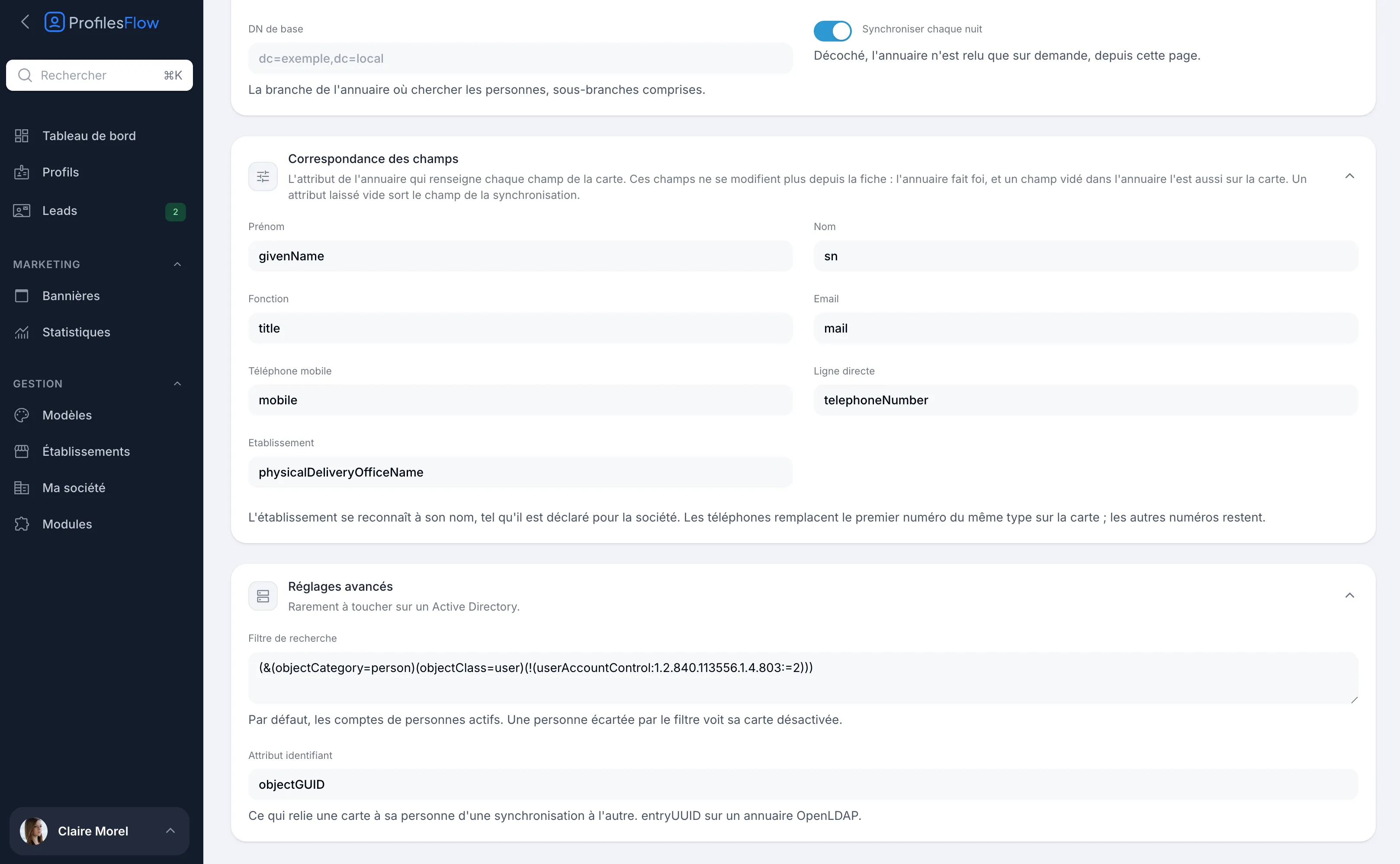
The Advanced settings, rarely needing changes on an Active Directory:
- Search filter: by default, active user accounts. A person excluded by the filter has their profile disabled.
- Identifier attribute: what links a profile to its person from one synchronization to the next.
objectGUIDon Active Directory,entryUUIDon OpenLDAP.
3. Test, then synchronize
- Click Test the connection. The test reads the directory without writing anything and shows Connection established with the number of people found under the base DN, and a few examples as their profile would show them.
- If the number and the examples are correct, click Synchronise now.
- The report is shown in the Status block once the directory has been read: profiles created, updated, disabled, skipped, and the list of rejected values.
With Synchronise every night, synchronization then runs every night at around 2:30 a.m.
How synchronization behaves
- The directory prevails. Linked fields can no longer be edited from the profile. A field emptied in the directory is emptied on the profile.
- No duplicates. On the first synchronization, an existing profile with the person's email address is linked to them instead of being created again.
- Disabling, never deleting. A person no longer returned by the directory (account deleted, disabled or outside the filter) has their profile disabled. A profile deleted by hand is never created again.
- Re-enabling. A profile disabled by hand is re-enabled at the next synchronization if the person is still returned by the directory. To exclude someone permanently, exclude them from the synchronized directory (base DN or filter).
- Safeguard. If the directory returns no one (wrong base DN or filter), nothing is disabled.
- Rejected values. A malformed or already used address, an unknown establishment, an unrecognized number: the field keeps its previous value and the issue appears in the report.
- Created profiles have no access to the management interface; their template comes from the assignment rules.
Billing: each person returned by the directory has an active profile, counted in the subscription. Adjust the Base DN or the Search filter to synchronize only the people who should have a card. See Subscription and billing.
Security
- The service account only needs to read the directory. Nothing is ever written to the directory.
- Its password is stored encrypted and is never displayed again.
- Prefer LDAPS or StartTLS: without encryption, the service account's username and password travel in clear text on the network.
- Restrict the port opening to the Profiles Flow server's address only.
- Only the attributes in the field mapping and the identifier attribute are imported into Profiles Flow.
Troubleshooting
The directory's technical messages are shown as is, in English, during the test or in the Status block (“Last failure”).
| Message | What to check |
|---|---|
| Invalid directory address | The Server field. |
| Directory login refused | The Service account and its Password, or the port and encryption. |
| StartTLS refused | The server does not accept StartTLS: try LDAPS (port 636) or check the certificate. |
| Directory search failed / incomplete | The Base DN and the Search filter. |
| The directory returned no one | No one found: nothing was changed. Check the base DN and the filter. |
If the test does not complete at all (timeout), the directory is not reachable from the Profiles Flow server: check the firewall and the port forwarding.
A field can no longer be edited on the profile
This is normal: it is linked to the directory. Change it in the directory; it will be picked up at the next synchronization.
An establishment is not picked up
The name used in the directory must match the establishment's name in Profiles Flow. Correct one or the other, then run Synchronise now again.